Midwest Ops Desk · Website inquiry intake for small tax-prep and bookkeeping firms
Every website inquiry lands in a shared Google Sheet with an alert, so none sits unseen in someone's inbox.
Inquiries come in by phone, email and your website form. When it gets busy, it gets "quite difficult to keep everything straight", and the follow-ups end up in an Excel file nobody checks.
Built in your own Google and Zapier or Make accounts · No passwords · No sales call · Automation only: it never handles tax documents, SSNs or bank details.
Start the 5-question scoping formFrom $125. Starter $125: 1 form → 1 Google Sheet → 1 email or Slack alert, about 3 days. Standard $650: up to 2 forms, Sheet plus 1 CRM, routed Slack and email alerts, error alert, duplicate check, about 5 days. Advanced $1,200: up to 3 related workflows, Sheets dashboard tab, auto-reply to the sender, digest of unanswered inquiries, about 8 days. Paid Zapier or Make plans are bought by you. Custom work: use the scoping form.

See the demo
Captioned walkthrough, about 25 seconds, fictional data.
Demo for a fictional bookkeeping firm. The auto-reply and 48-hour digest shown are Advanced ($1,200) features.
The demo uses fictional data. Every name, email and firm in it is made up. The same demo is on Contra.

What it does
Starter ($125): form → Sheet → 1 alert
-
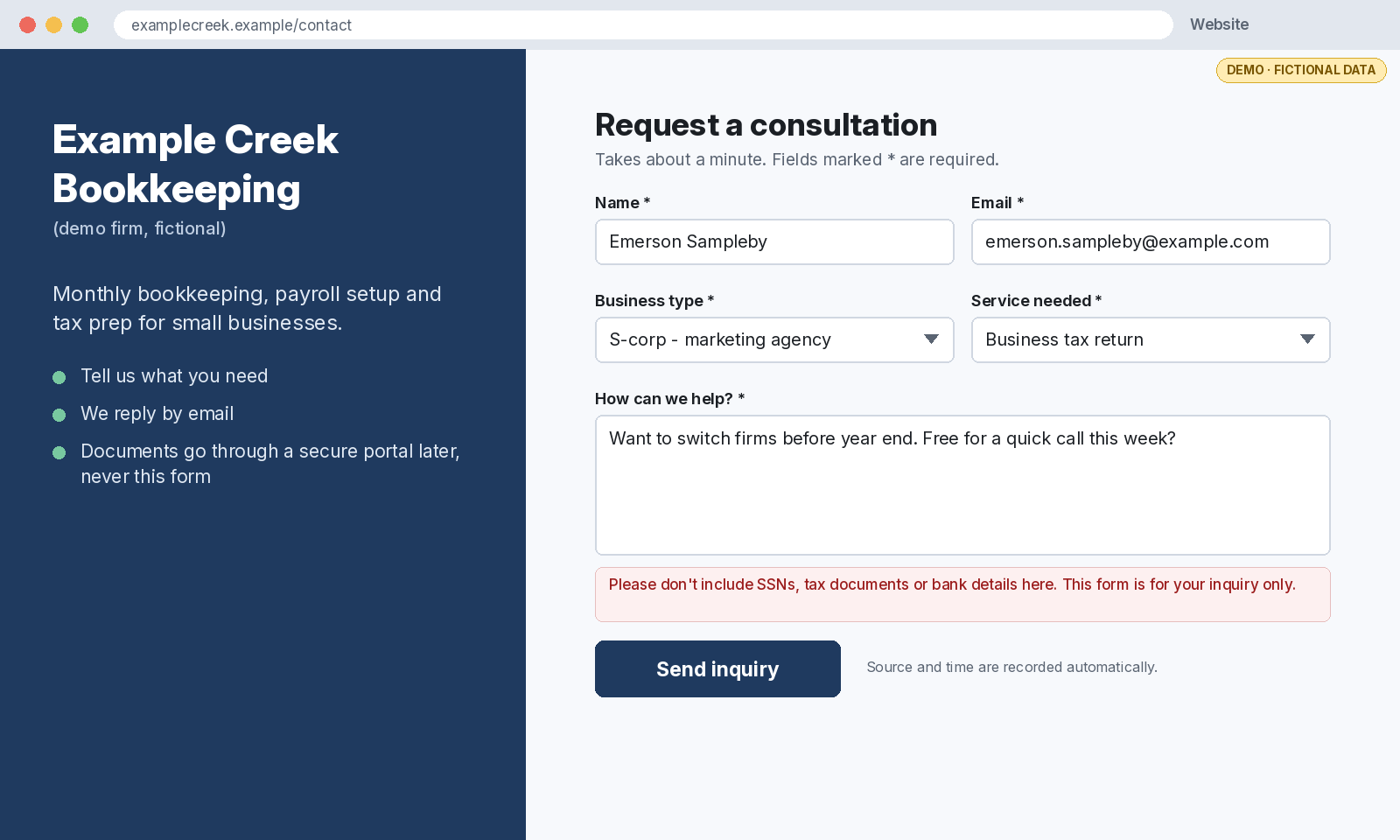
Form
Your website form collects name, email, business type, service needed and a short message.
-
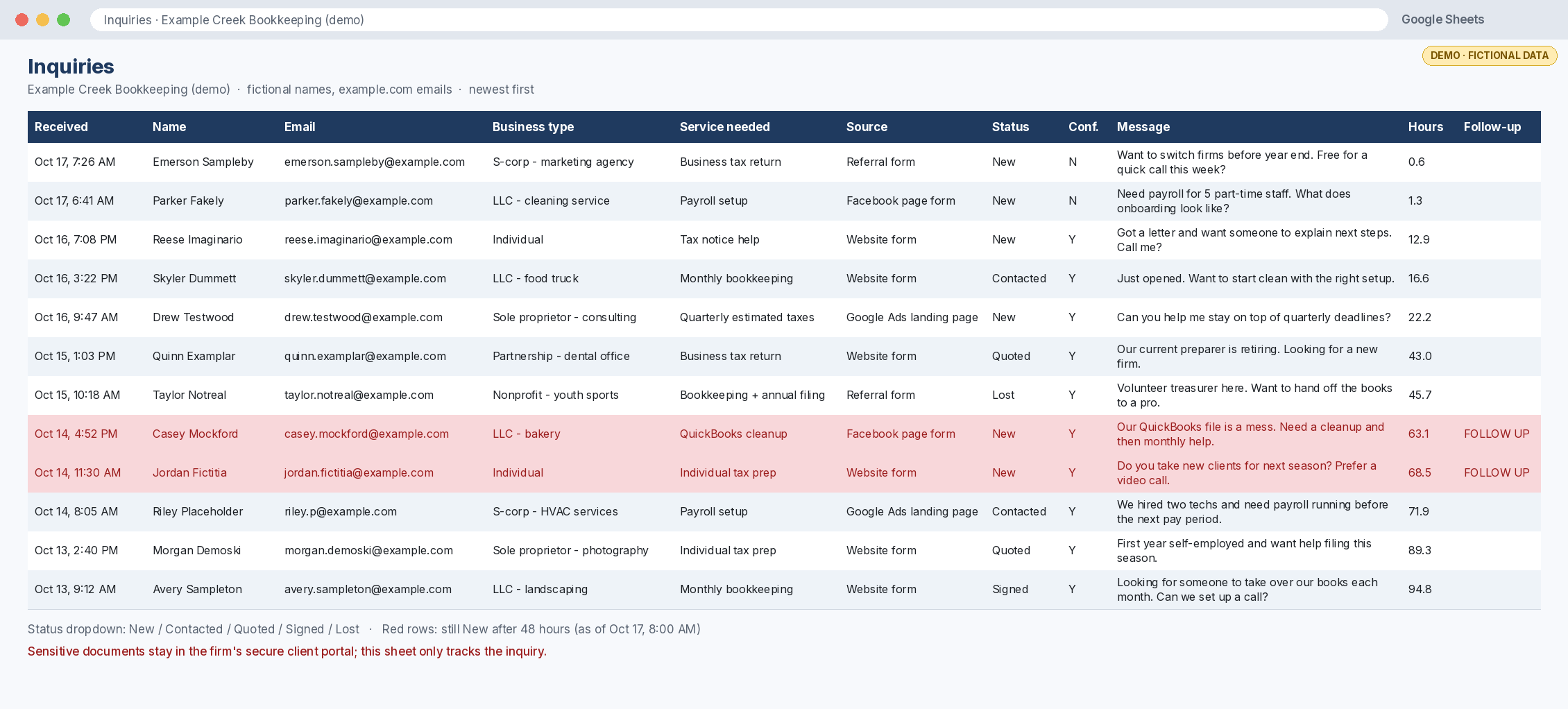
Sheet row
A new row lands in a shared Google Sheet with source, timestamp and a status dropdown.
-
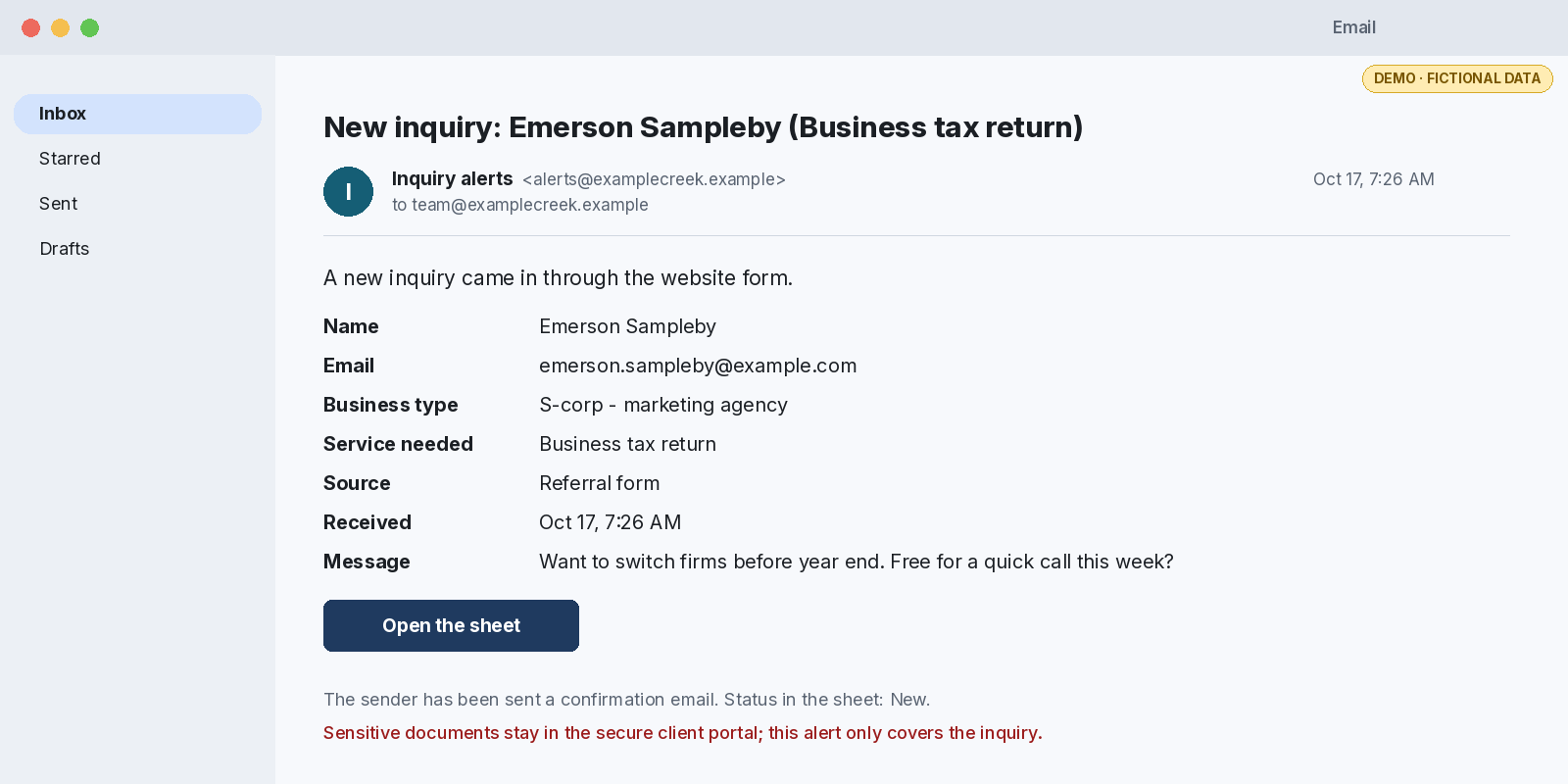
Alert
Your team gets an email or Slack alert, so someone owns the inquiry.


Advanced ($1,200) adds
-
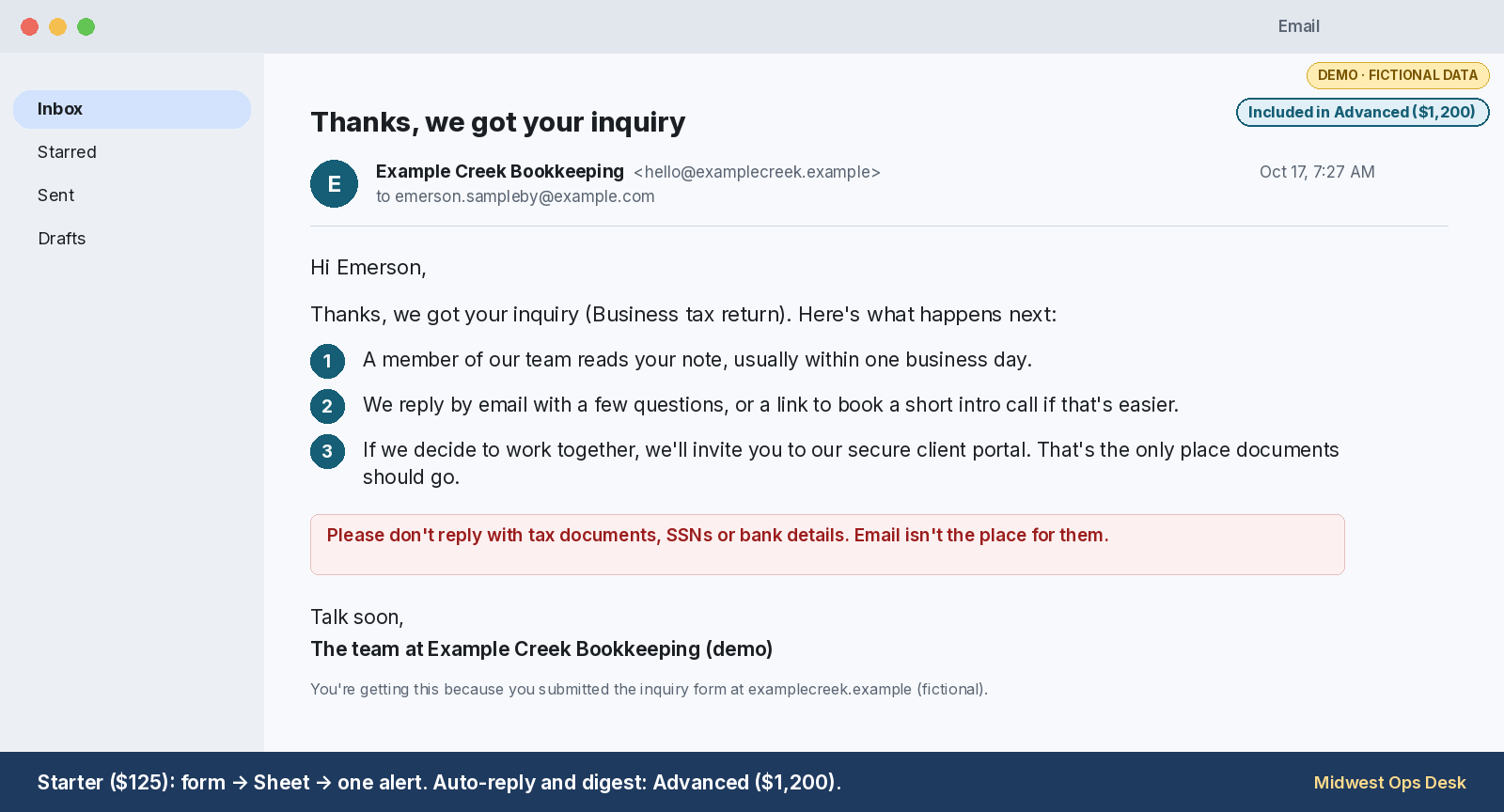
Auto-reply
$1,200 featureThe sender gets a confirmation email explaining what happens next.
-
48-hour digest
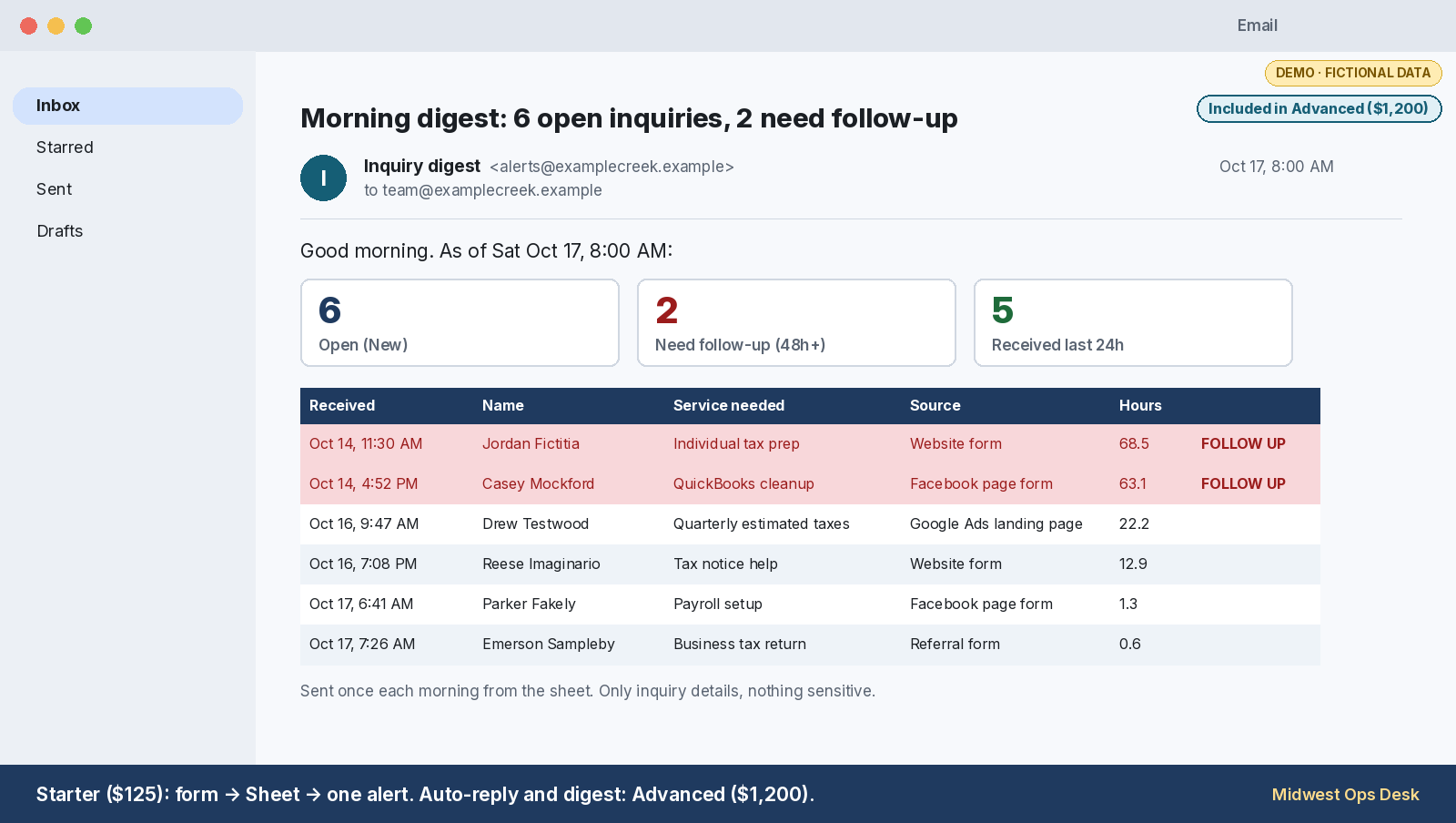
$1,200 featureEach morning, a digest lists open inquiries and flags any still marked New after 48 hours.


How it works (no call)
- 1Scoping form. Answer 5 short questions about your form, your tools and who should get alerts. Open the form.
- 2Scope in writing. You get the tier that fits and a fixed price, including whether the free Zapier or Make plan covers your volume.
- 3Build and test. I build in your own accounts with access you grant, and you test it with a sample inquiry before you approve the work.
Pricing: from $125
Three fixed-price tiers. Every tier includes 1 revision and is built in your own accounts. No passwords.
Starter
$125
Form to Sheet + Alert
- 1 form → 1 Google Sheet
- 1 Zap or scenario
- 1 email or Slack alert
- 1-page how-it-works doc
- About 3 days
- Not included: duplicate check, auto-reply, digest
Standard
$650
Lead Intake + CRM
- Up to 2 forms → Google Sheet plus 1 CRM
- Up to 3 Zaps or scenarios
- Slack and email alerts with simple routing, plus an error alert
- Duplicate check
- How-it-works doc plus walkthrough video
- About 5 days
- Not included: auto-reply, digest
Advanced
$1,200
Intake Ops Pack
- Up to 3 related workflows
- Google Sheet plus a Sheets dashboard tab
- Up to 6 Zaps or scenarios, with filters
- Alerts plus error alerts, duplicate check
- Auto-reply to the sender
- Digest of unanswered inquiries
- How-it-works doc plus a captioned walkthrough video
- About 8 days
Custom work? Start with the 5-question scoping form.
Not included in any tier: paid Zapier, Make or Google plans (you buy those from the vendors directly), ongoing monitoring, custom code or APIs without a Zapier/Make connector, moving old data, setting up a CRM from scratch, any bookkeeping or tax work.
Add-ons, built in your own accounts
Small fixed-price builds in your own Google and Zapier or Make accounts. No passwords, and we never copy or export your data. Automation only: we don't do bookkeeping or tax work.
Review-request flow
Mark a client "Completed" and the same review request goes out from your Gmail, with one follow-up 7 days later unless staff mark them "Reviewed" or "Do not contact". Every client gets the same ask: no screening, no rewards.
$250 fixed · About 3 business days
Sheets invoice and AR tracker
Your firm's own invoices in one Google Sheet, with aging buckets, overdue highlighting, a dashboard and a Monday summary email. No bank or accounting-software connection.
$350 fixed · About 5 business days
Client document-request reminders
A checklist of document types per client, and scheduled reminder emails that link to your own secure client portal. Documents never pass through the Sheet or email.
$300 fixed · About 4 business days
What this build does not touch
The inquiry-intake build only handles inquiries. Client tax documents, SSNs and bank details stay in your secure client portal.
The form, the Sheet and the emails carry contact details and a short message only. The auto-reply asks senders not to email documents.
Contact
The fastest start is the 5-question scoping form. Questions first? The email address is in the footer.